New features go unused
A release adds a better way to do the job. People keep the old way, because nobody showed them the new one.
The cost: The work behind the feature does not pay back.
Every release moves a button, adds a field or changes a flow. GuidedRole versions your training with your product, lets you give the new lessons to each role a change affects, and shows you who has passed them.
Courses updated by FasterApps · Practice on your test site · Works in Chrome
send-reminderNot found 5 / 9The Send button moved into the Actions menu in the last app release. Lesson 3.2 needs review.
Every release changes what people need to know. When the training does not change with it, the cost turns up all over the company.
A release adds a better way to do the job. People keep the old way, because nobody showed them the new one.
The cost: The work behind the feature does not pay back.
Customers ask about the change before the people answering them have seen it. Agents guess, escalate or promise to come back.
The cost: Longer queues and uneven answers while everyone catches up.
Demos, decks and launch posts show last month’s screens, or leave out what is new.
The cost: Prospects notice the gap between the pitch and the product.
Help articles and internal wikis are updated last, if at all, and nobody can tell which page is current.
The cost: People stop trusting the documentation and ask a colleague instead.
Videos and walkthroughs show a button where it used to be. Learners follow them and get stuck.
The cost: The training teaches the wrong thing, and someone has to undo it.
With GuidedRole, your course gets releases of its own: updated from your code by FasterApps, assigned to the roles that need them and checked with an assessment.
See the release cycleHere is what happens between a product release and a team that can use it, and who does each part. Select a stage to read how it works.
A release moves a button, adds a field or changes a flow.
An AI coding agent reads the change and rewrites the lessons it affects.
It arrives as a draft. Publishing it retires the previous release.
A path with the new lessons reaches each training role, with a due date.
Then your product ships its next release, and the cycle starts again.
Five steps, repeated with every release, from the change in your code to an assessment that shows people can use it.
FasterApps builds and updates your course. An AI coding agent reads your application’s source code, read-only, to find what a release changed. It rewrites the affected steps, hints and assessment criteria in the words your screens use.
3.2Send a payment reminder
Found in the source codeThe Send button moved into the Actions menu.
Steps rewritten
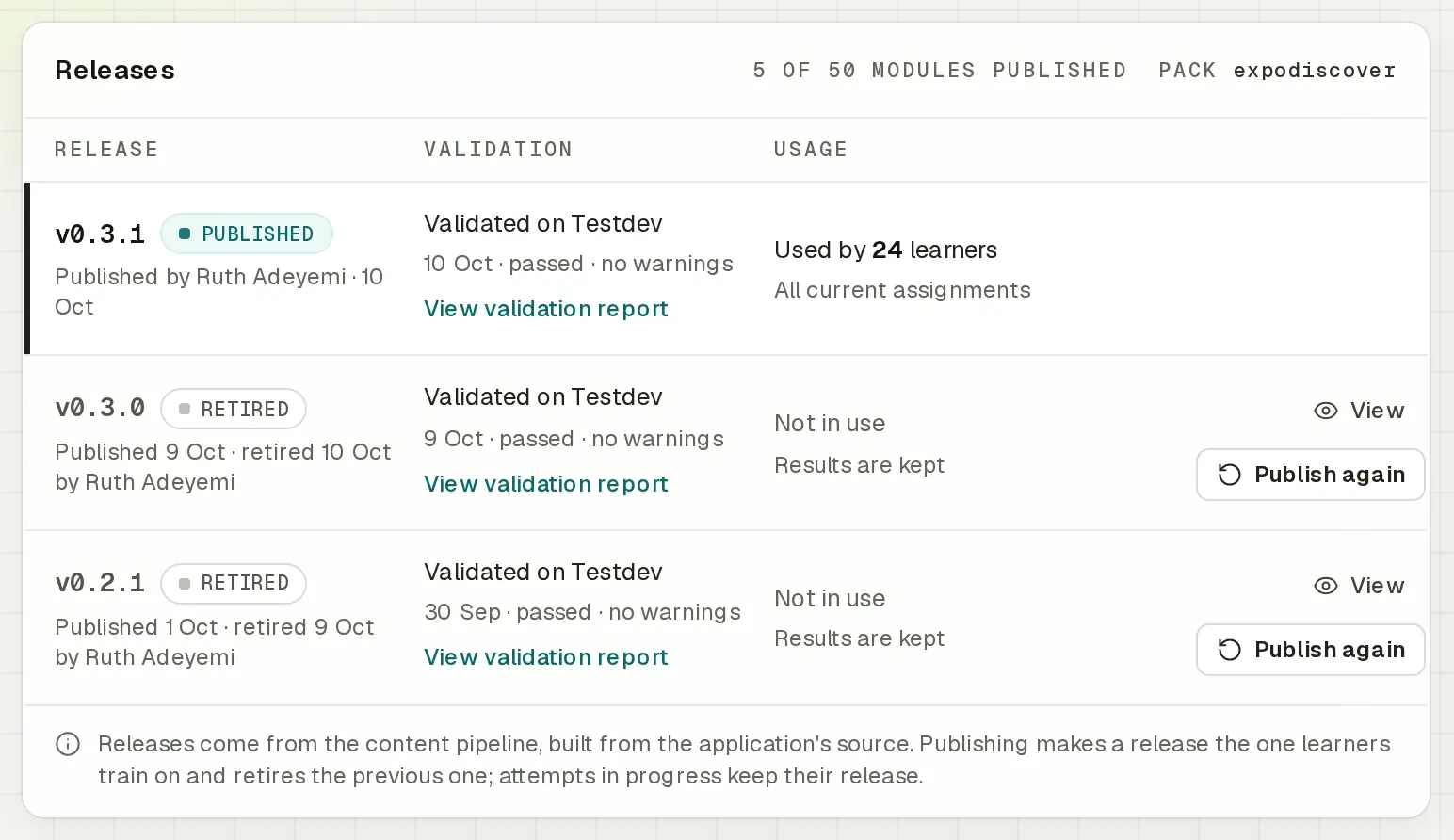
Courses are versioned like software, with semantic versions such as 0.5.0. A workspace admin reviews the draft in Curriculum and publishes it, and the previous release is retired at the same moment.
New practice sessions and assessments use the new release. Attempts in progress keep the release they started on, and earlier results stay as they were graded.
Publish v0.5.0?
New practice sessions and attempts in Customer portal use v0.5.0. The published release v0.4.0 is retired.
Attempts in progress keep the release they started on, and earlier results stay as they were graded.
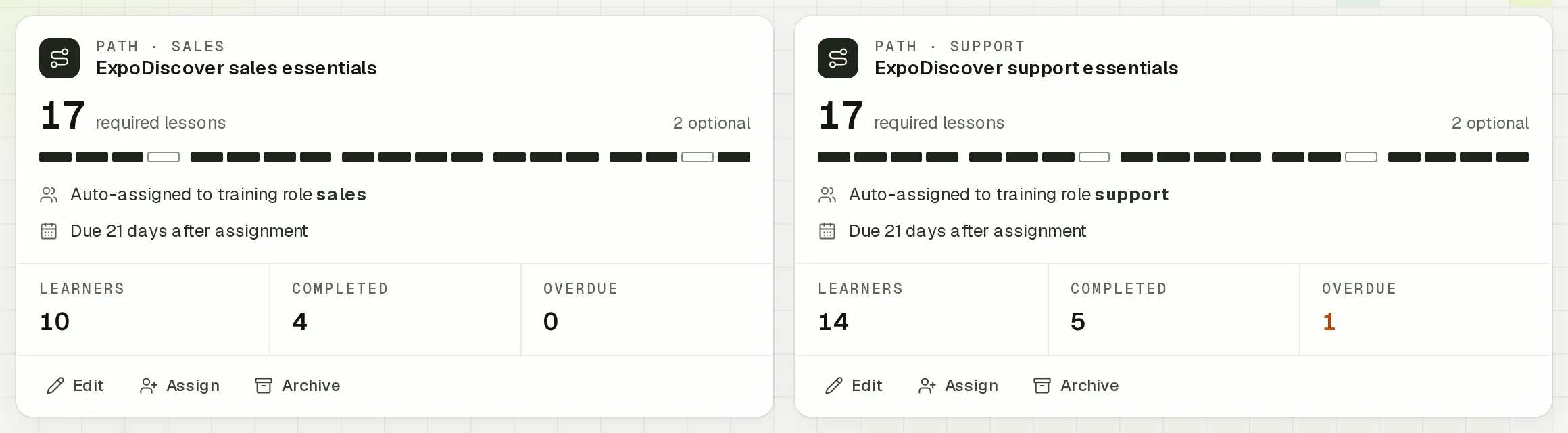
Support essentials is assigned to members with the training role support who have never held it.
Paths hold the required and optional lessons for each training role, such as support or sales, with a due date. Give a release’s new lessons a path of their own, such as Launch: Payment links. Saving it assigns it to everyone with the training role, with a due date.
When a release is published, paths with a training-role rule also reach members with that role who have not held them before. Admins can also assign a path to any member, with a due date of its own.

Every lesson has an assessment with an outcome-only brief: no hints, no highlights and no Guided Mode. GuidedRole checks the result on the page, and can reopen the saved page in a background tab to confirm the work was saved or made public.
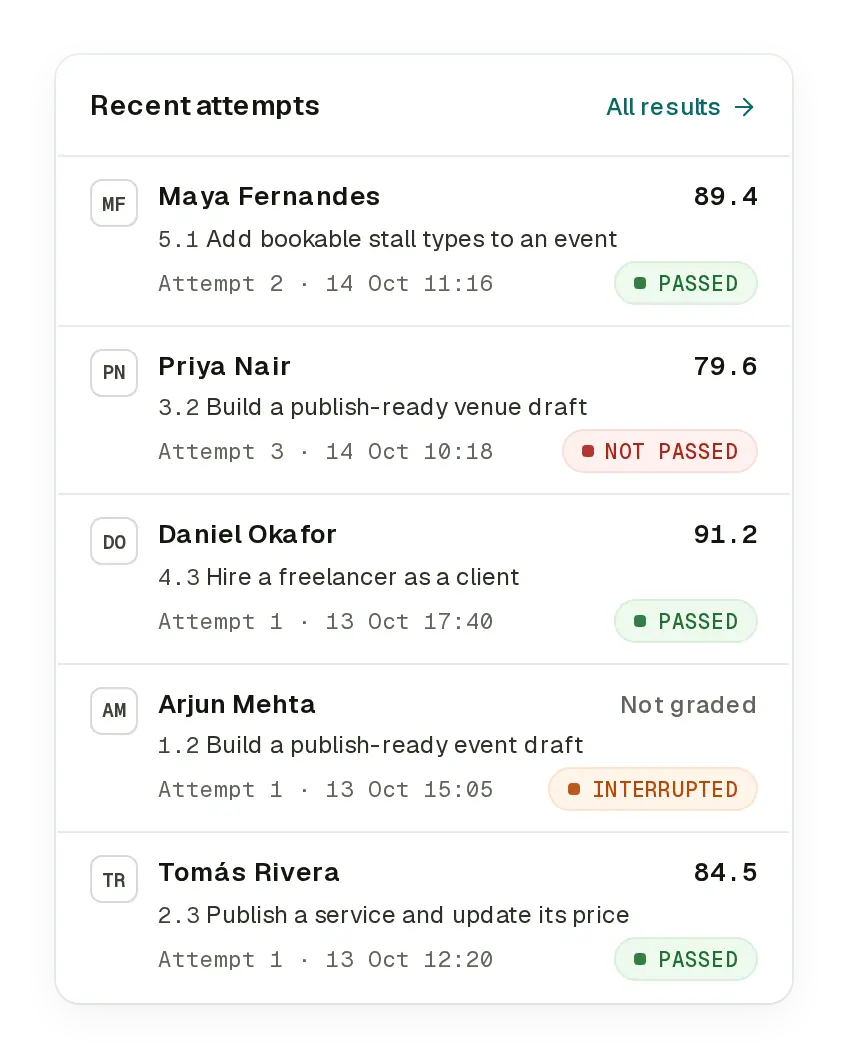
With the default scoring, a pass needs 80 points and every critical outcome. Results show each attempt with its accuracy, time and actions, and the overview shows who is on track, overdue or needs attention.
3.4Approve a refund
GuidedRole records how it finds each target on the page, release by release. When a target keeps needing a fallback, matches more than once or goes missing, its lesson is flagged for review, beside its pass rate and median time against the reference, so it is fixed before more learners get stuck.
A fallback match is still exact, so scores stay valid while FasterApps updates the lesson. If a target stops resolving during an assessment, the attempt is interrupted as a content problem and is not counted against the learner.
3.2Send a payment reminder
1 target needs review on v0.4.0send-reminderNot found 5 / 9Re-validate lesson 3.2 against the test site.A target needs review when, over at least three lookups, it matched more than once or was not found in 10% of them, or needed a fallback in 30%.
When the site fails or a target can no longer be found, the attempt is not counted against the learner. Every result keeps the release it was taken on.
The site showed “Something went wrong” while saving. This attempt is not counted against you.
When the test site shows an error page or another technical signal, the attempt ends as “Incomplete – technical”. It is not counted against the learner, a retake is always available, and a technical issue opens for your admins.
3.3Refund an order
Attempts stopped by a technical problem are never counted against you.
Each attempt is pinned to the release it was taken on, so results from an earlier release stay exactly as they were graded.
3.2Send a payment reminder
Saved for this workspace, without a new release.
If a change makes a task take longer, admins adjust its time and action benchmarks for the workspace, without waiting for a new release.
FasterApps builds and updates courses for its customers. An AI coding agent works from your application’s source code, read-only. Every update is validated automatically and tried on your test site before it reaches your workspace as a draft. There is no point-and-click course editor or recorder in this version.
No. Nothing is installed in your application. Learners use the GuidedRole extension in Chrome 142 or later on your test site, which an admin sets up under Applications.
They stay as they were graded. Every attempt keeps the release it was taken on, and an attempt in progress when a new release is published finishes on its own release.
Only if it adds modules. Plans count modules across the published releases of applications that are not archived: 10 on the trial and Startup, 20 on Business and 50 on Enterprise. Publishing a release replaces the previous release in that count. See Pricing for every limit.
On the Enterprise plan, Guided Mode answers questions during practice from the course’s knowledge articles and the current lesson and step, and points at the control it means on the page. It is never available during assessments, and admins can turn it off.
Yes. Give them the trainer role: trainers see learners, results and technical issues, and can close technical issues. They do not open step-by-step timelines or change paths, releases or settings. Owners and admins can open a recent attempt’s timeline when they coach someone; each opening is recorded in the audit log.
Start a 14-day trial, or talk to FasterApps about building and updating a course for your application.
14-day free trial · No payment details · Works in Chrome